Decide how much every AI agent is allowed to do.

AI agents like Claude Code, Codex and Cursor can read your files, run commands and use your keys. Cuff gives each one a dial, from no access to full trust, so you choose what it may touch. On your own computer, or on every computer in your company.

The app is free, with no account. Teams are free for up to 3 people. Works with Claude Code, Codex, Gemini, Cursor and your own bots, on Windows, macOS and Linux.
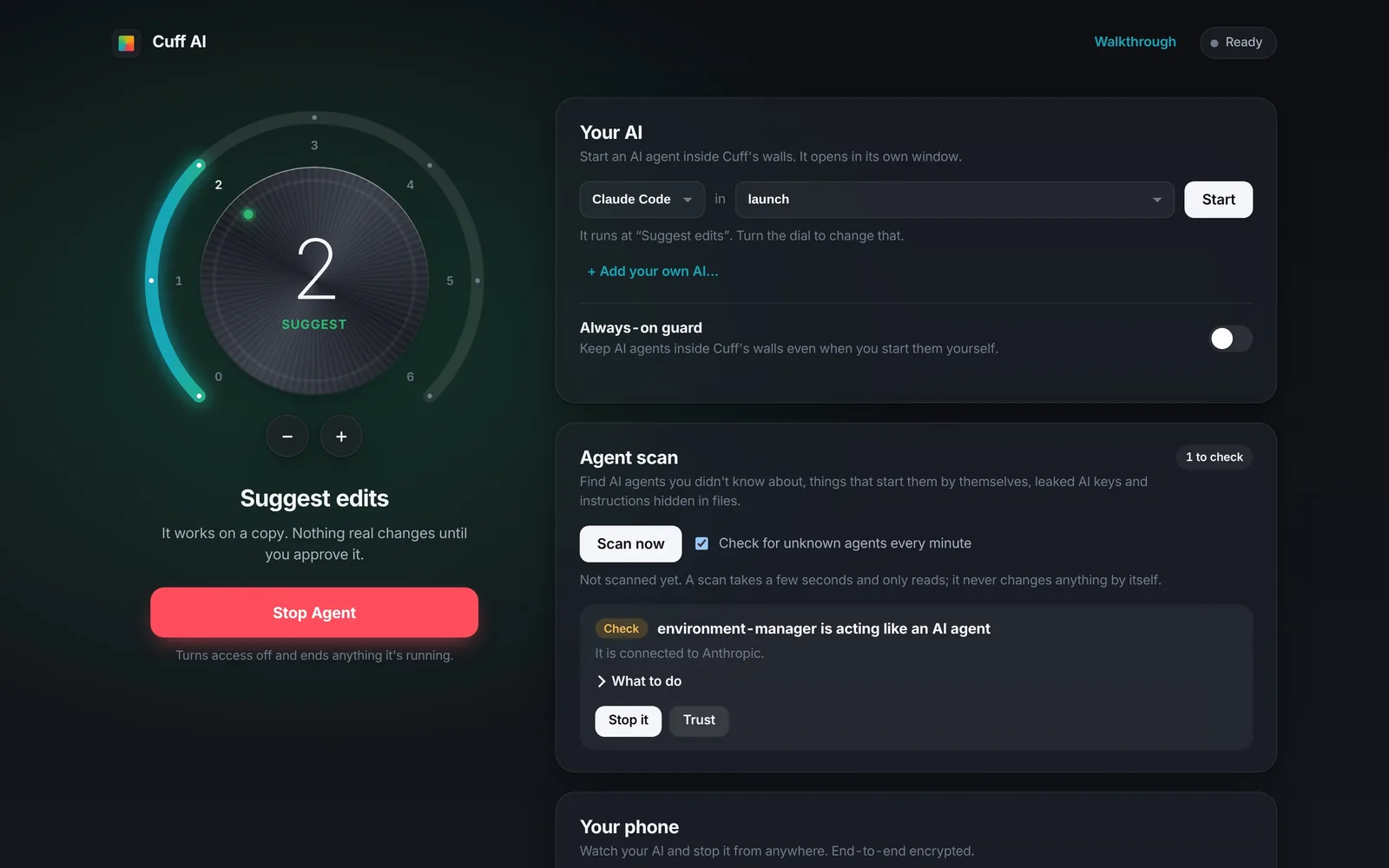
The Cuff desktop app: the dial at level 2, start Claude Code, and the agent scan
1

Install the free app

A short walkthrough sets it up. No terminal, no account.

2

Start your agent through Cuff

It begins with no access. Your SSH keys, passwords and cloud logins stay hidden from it.

3

Turn the dial as you trust it

Let it look, suggest, then make changes. Review what it did and undo anything.

For your company

An admin console plus the free app on each computer. For IT and security teams.

  • Every AI agent on every computer, in one list
  • One signed policy caps what agents may do everywhere
  • Company agent scan, with remote stop from the console
  • Tamper-evident audit log of every change

Free for up to 3 people, then from $9 per person a month

For yourself

The desktop app on your own computer. No account needed.

  • A dial from 0 (no access) to 6 (full trust) for every agent
  • Review each change before it happens, and undo anything
  • Find AI agents and leaked AI keys you didn't know about
  • Your phone as a remote, and Cuff for Chrome

The app is free. Pro, $15 a month, adds Cuff's own AI in the browser.
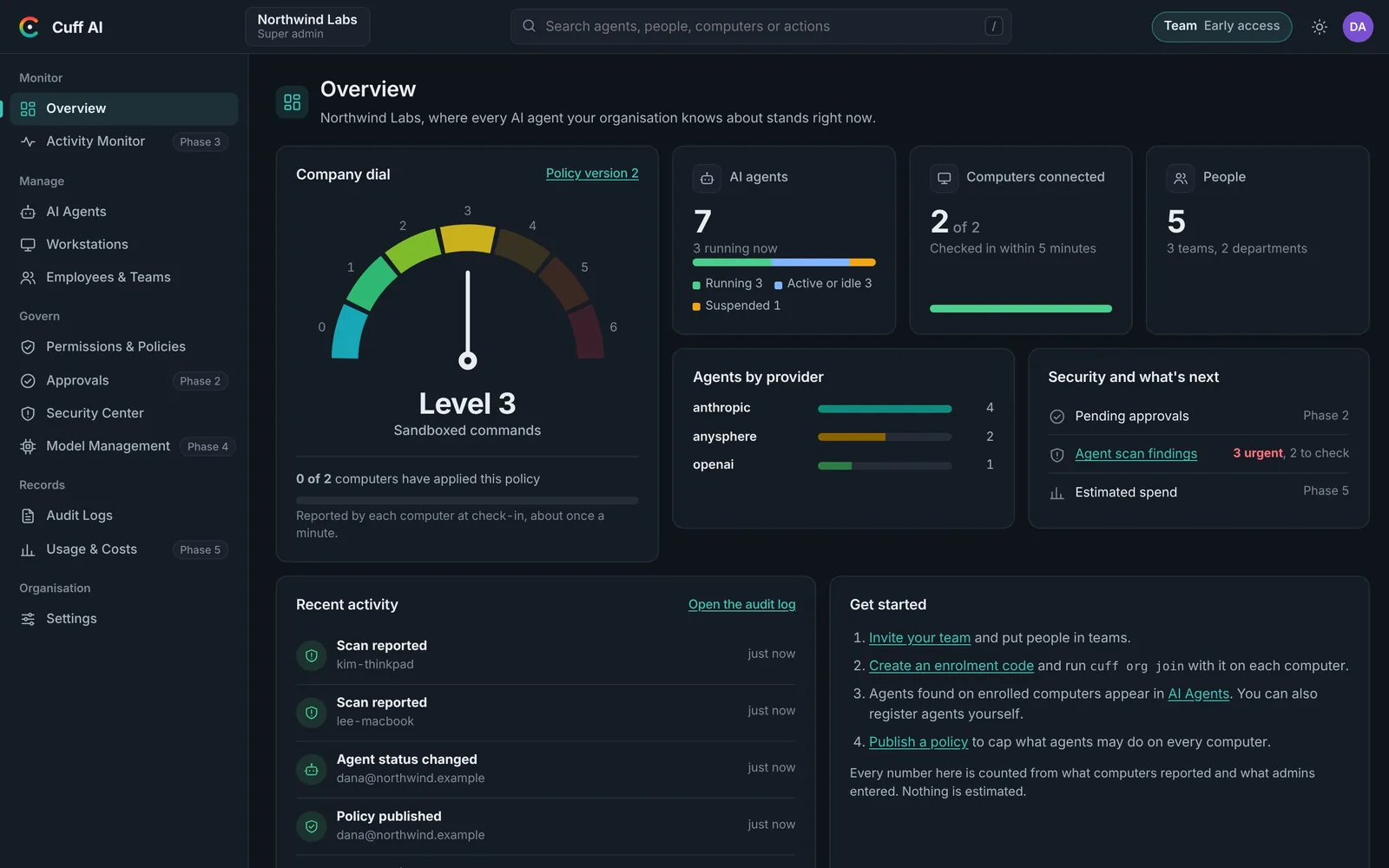
For business: one console for every agent.

Each computer runs the free Cuff app and reports in about once a minute. Admins see and control everything from the browser.

Your first day

  1. Create your organisation. Free for up to 3 people, no card.
  2. Send the join code. Each person installs the free app and enters it.
  3. See every agent. Within about a minute, each computer's AI agents show up in your console.
  4. Set one limit. Pick a company dial level. It's signed with your company's key and applied on every computer.
Cuff company console

Overview: the company dial, agents, computers and people, counted from what computers report.

  • Know what's runningAgents are found by what they do: AI connections, keys, AI libraries, startup items and MCP tools.
  • Set one limit for everyonePolicies are signed with your company's key. Each computer checks the signature before applying it.
  • Act without touching the computerStop an agent, turn off what starts it, or trust it. The employee sees each request.
  • Prove it to an auditorAn append-only, hash-chained audit log, with JSON and CSV export.
  • Chrome tooCuff for Chrome is set by Chrome policy, so AI-driven tabs ask before sending or paying.

Starter

$0

Up to 3 people

  • Admin console, roles and teams
  • Agent list from every computer
  • Signed company policies
  • Tamper-evident audit log
  • Two-step sign-in
Start free
Most popular

Team

$9/person/month

Billed yearly, or $11 monthly. First 7 days free.

  • Everything in Starter
  • Unlimited people and computers
  • Company agent scan with remote stop
  • Two-step sign-in required for admins
  • Audit export
Start Team

Business

$19/person/month

Billed yearly, or $23 monthly

  • Everything in Team
  • Human approvals and rules Coming
  • Live activity and kill switch Coming
  • Security alerts Coming
Start Business

Enterprise

Custom

100 people or more

  • Everything in Business
  • SIEM export Coming
  • Your own signing keys Coming
  • Invoice billing
Talk to us

Early access: organisations created before 15 November 2026 keep Team free until 15 December 2026. Each person can enrol up to 3 computers. Compare plans

For individuals: the free app.

Download it, and every AI agent you start through Cuff begins with no access. Turn the dial to let it do more.

The Cuff desktop app: the dial at level 2, start Claude Code, and the agent scan
  • Everything in the app is freeThe dial, review and undo, the agent scan, the phone remote and Cuff for Chrome. No account, no card, no time limit.
  • Secrets stay hiddenSSH keys, passwords, cloud logins and browser profiles are invisible to agents below full trust.
  • Internet on your termsAgents reach only the sites you allow, and protected sites need a fresh yes from your phone.

Free

$0

The desktop app, phone remote and Chrome extension. Cuff AI Web works with your own Claude or OpenAI key.

Download

Pro

$15/month

Adds Cuff's own AI ($6 a month, every Claude model), level 5 and downloads in Cuff AI Web, and phone approvals in Chrome. The desktop app is the same.

Get Pro

Works with Claude Code, Codex CLI, Gemini CLI, opencode, Aider, Goose and your own Python or Node bot.

Download Cuff AI. It's free.

The same app for individuals and companies. A short walkthrough sets it up, no terminal needed. To join your company, enter the code your admin sends you.

All versions: releases page · No install: use Cuff AI Web · Phone remote: open on your phone